Sunday, February 3, 2019

Download Lynda.com Premium Tutorials Courses

Download Lynda.com Premium Professional Courses directly to your PC?

If you are using the trial Lynda account valid for the specific duration, you will not be able to access your previously watched courses or new ones until you renew your subscription.

a) Install Cookies.txt Extention in Chrome Browser.

b) Login To Lynda.com with Premium Account and select your favorite course. Click cookies.txt and it will download the cookie file of your favorite course.

c) Open the command prompt with admin rights and use the below command to initiate the favorite course to download:
http://bit.ly/LyndaCommand

I have included the Live Demo of all the above steps, I hope if you are facing any issues, the tutorial will help you:


Thanks a ton for reading my blog.

Ajey Gupta
(Exchange Admin)

Saturday, December 1, 2018

Installing & Configuring 3rd Party SSL Certificate in Exchange Server 2019

Installing & Configuring 3rd Party SSL Certificate in Exchange Server 2019


How to install and configure 3rd Party SSL Certificate in Exchange Server 2019, 2016, 2013 or 2010. Its must in production environments, ADFS and also a prerequisite while performing Hybrid Migration in Office 365. If an On-Premise Exchange Server has to be published worldwide, configuring 3rd party certificates from Public CA is a must.

Using the easy method explained in this video you can configure 3rd Party certs on whichever version of Exchange you are running (starting from Exchange 2010 SP3 til 2019).

Friends, in Exchange Environments, none of the major tasks gets completed. We get a red warning "Not Secure" because the self-signed certificates are not trusted.

Mostly big organizations purchase 3rd party certificates. There are many 3rd Party Certificate authorities available:

a) Comodo - (Provides 90 Days free Certificate for testing)
b) Symantec,
c) Go Daddy,
d) DigiCert,
e) Entrust

and many more. They cost a huge amount to provide a single name SAN Certificate.

Mostly admins have to face a tough time during the time when the pre-installed certificates are going to expire or expired. I recommend you to follow the steps explained and I hope you will find success.

Steps to install & Configure 3rd Party SSL in Exchange Server:

Method 1:

a) Create CSR and include all the names and autodiscover.yourdomain.com

b) Login to 3rd Party Cert website and upload that CSR and request the 3rd party Certificate.

c) They will issue a certificate within a few hours which you can download and install using the process explained in the video.


Method 2: If you are an expert:

a) Write down all SAN Names you and your Exchange Environment will require to run Exchange Server globally.

b) Login to 3rd Party Cert Website and add the domain names at once and download the Certificate.

c) You have to create the .pfx file and when you will create it, it will ask you to enter the password for its security, so that no one can import your domain certificate.

We can also Install and configure the SSL Certificates for Exchange Server using Exchange Management Shell. 

After watching the video, I hope you would have got an idea on how to install, configure Certificates in Microsoft Exchange Server 2019. If you face any issues while configuring the Certificates, state the error or issue below. I will try to revert with the best possible resolution asap.

About: AKGInfotech is a YouTube Channel, where you will find an easy explanation of Technology related concepts :)

Visit Blog: https://www.akginfotech.com and https://fulldayenergy.blogspot.com

Friends, thank you so much for watching. If the video helped you in any way please appreciate by Subscribing the Channel. It gives me the motivation to create more videos. Take good care of yourself and I will see you in the next video.

Monday, November 26, 2018

Boya BY-M1 Cell Change | Lavalier Microphone Battery replacement | LR 44

Boya by m1 lavaliere microphone Boya is a high-quality condenser microphones brand; it creates the true nature of sensory experience customers. This by-m1 microphone with the clip-on mic is specially designed for smartphones, DSLR, camcorders, audio recorders, pc, etc.

Do check out its Live Video Demonstration on how to change its battery easily.


Superb sound for presentations and video recording. Clip-on microphone design for smartphones, DSLR, camcorders, etc. Omnidirectional condenser microphone. The high-quality condenser is ideal for video use. Low handling noise. TroubleShoot steps:- There is one switch on the condenser of the mic, For mobiles/camera, User has to switch it on mobile when using with mobile and switch it to camera/PC when using with the camera, the otherwise mic will not work. Also advised to read the User manual before using the product.

BY M1 Lavalier Microphone by Boya – A Convenient Microphone with Stellar Audio Pick-Up
This Boya lapel microphone can be your go-to equipment for recording videos or audio clips while you’re on the move. This compact mic can be clipped to your collar to allow hands-free utility, while the omnidirectional pickup reproduces voices and ambient sounds faithfully. It can be connected to smartphones, DSLR cameras, camcorders, PCs and any other device with a standard 3.5mm jack.

Omni-Directional Condenser Microphone
This microphone by Boya is ideal for picking up audio from every direction. It is ideal for recording voices and ambient sounds for video or audio clips and reproduces all kinds of sounds faithfully.

Clip-on Design
Use this clip-on omnidirectional condenser microphone to your collar or your placket and enjoy hands-free utility. You can easily hold your smartphone or DSLR in one hand and keep the other hand free while creating your clips.

Easy-Access Controls
You do not have to worry about complicated controls with this lapel mic from Boya. The well-marked controls are conveniently placed to provide you with an easy reach.

For More: Click Here

Wednesday, November 7, 2018

Celebrating Diwali with Sweets, Messages, Gifts & Happiness. Happy Diwali

AKGInfotech.com wishes its readers a very Happy Diwali

Diwali (or Deepawali) is the biggest and the brightest of all Hindu festivals. It's the festival of lights which literally illumines the country with its brilliance, brightness and dazzles all with its joy.


Diwali (Dipavali in Sanskrit) means row of lamps is a Hindu festival of lights, which is celebrated every autumn in the northern hemisphere (spring in southern hemisphere). During the celebration, temples, homes, shops and office buildings are brightly illuminated.

Why Do we Celebrate Diwali?


Diwali is celebrated to honor Ram Chandra, the seventh avatar (incarnation of the god Vishnu). On this day Ram returned after 14 years of exile during which he fought and won a battle against the demon king, Ravana.

People lit their houses to celebrate his victory over evil (light over darkness). The goddess of happiness and good fortune, Lakshmi, also figures into the celebration. It is believed that she roams the Earth on this day and enters the house that is pure, clean, and bright.


Diwali is usually celebrated eighteen days after the Dussehra. The cleaning of houses, painting walls, decorating every entry with colors and decorating every corner of the house with row of lights etc, clearing away the unnecessary elements and old clutter from your surroundings are the activities we enthusiastically look forward to doing every year when Diwali comes.

Remember that to make space for new things in life, you must be willing to let go of old junk and broken down items that are beyond repair. Many Hindus associate the festival with Lakshmi, the goddess of wealth and prosperity, and wife of  Lord Vishnu.


Similar to the Thanksgiving festival in the United States, it’s the time of the year when people come home to spend time together as a family. Thank God for these people in your life and let them know that you care on a regular basis. This is what makes the world go around.

On Diwali evening we worship Lakshmi, Ganesh and Saraswati. Bring out your silver coins and offer them to bless your wealth. Seek abundance as well as spiritual wealth and guidance in finding your lakshya, or true purpose in this life.
A festival full of sweet childhood memories,
A sky full of lights,
Mouth full of sweets,
And heart full of joy.
Wishing You All A Very Happy Diwali!
In some parts of India, the day after Diwali is marked with the Govardhan Puja and Diwali Padva, which is dedicated to the relationship between wife and husband.

Wish u and your family a very HAPPY DIWALI and a PROSPEROUS NEW YEAR! May God fulfill all your dreams and bless you with health, wealth and happiness.

How you Share The Excitement

Now that the festival season starts with Diwali starting now, thanksgiving around the corner and the holiday season approaching, what special arrangements have you done this year to make it a memorable year end?

Thankyou for reading. Please share your thoughts in the comments. Do Subscribe us on Youtube below.

Ajey Kumar Gupta

Next Blog: Challenges to start your Business Online.

Sunday, November 4, 2018

Challenges to starts Your Business Online.

Duration To Read: 3 Minutes.

“If people like you, they’ll listen to you, but if they trust you, they’ll do business with you." — Zig Ziglar

Sometimes it takes ages to get an idea for a business to start. Being on an entrepreneurial journey everyone faces different sets of problems. It may be managing delivering best services, hiring right talent, business operations or marketing.

Overview

In this information age, the modern generation has moved towards online. Thus, digital marketing has become an important part of your business.
From my experience, on the road to digital entrepreneurship you may face five common challenges to start your business online. Lets dig deep dive into them & find their solutions.

To Read more: Click Here

Thursday, November 1, 2018

Why Laughing & Cracking appropriate jokes at work works well?

Duration To Read: 4 Minutes.

Remember: Just Don't offend someone.

Research revealed that when colleagues at work laugh together, it can increase their productivity and innovation at workplace.

In Harvard Business School, researchers have found that people recognize those who have a tendency for humor as more competent and confident than those who don’t feel as comfortable telling jokes.


There were two experiments conducted:

In first, the researchers asked around 150 participants to analyse testimonials of a fictional company. The first testimonial was deliberately meant to be serious and the second to be funny.

To Read More: Click Here

Visit Blog: https://www.akginfotech.com/2018/11/why-laughing-and-cracking-appropriate-jokes-at-work-works-well/

Thanks,

Ajey Kumar Gupta
(Exchange Admin)

Monday, October 29, 2018

Google Home Hub - Everything you need to know about it.

Google newly launched 7 inch smart Google Home Hub. It seems like Google did experiment with a tablet and its home mini and combined both to build a smart Google Home Hub. It has an ambient light sensor that can auto-adjust the brightness depending upon the light present in the room. The biggest drawback is that it lacks a camera.
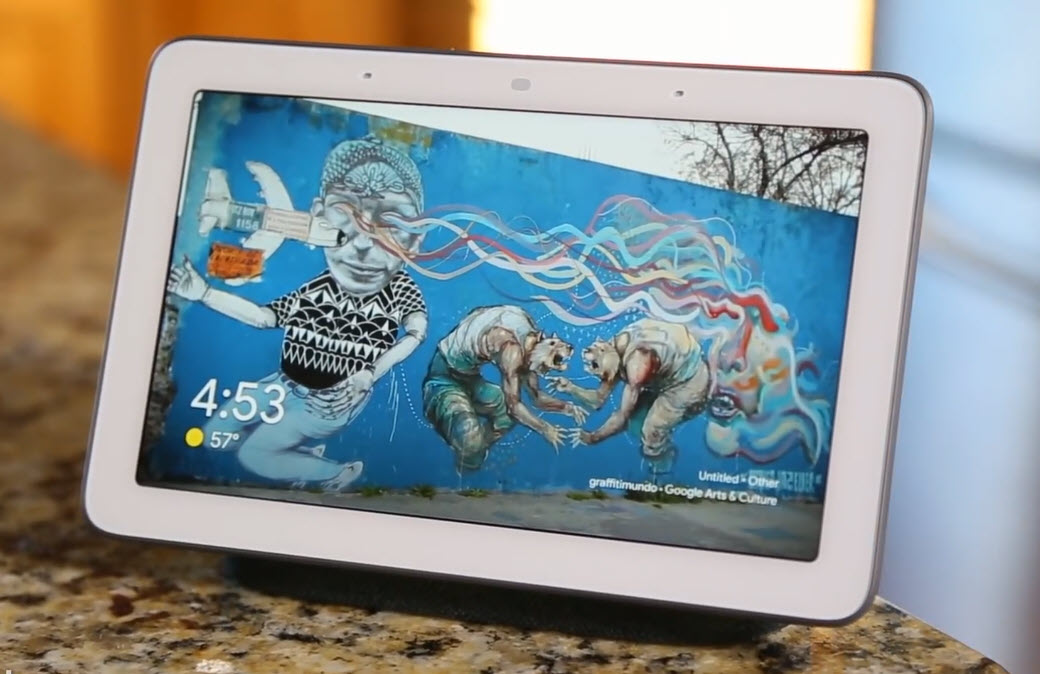

What it will look like?

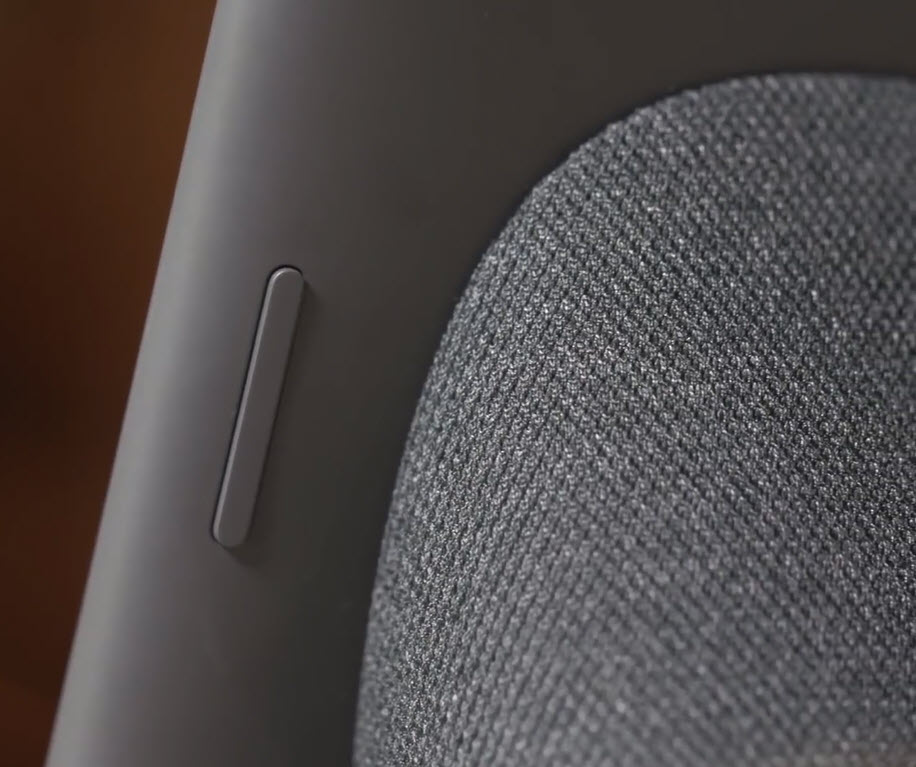
Google Home Hub is 7 inches by 4.5 inches tall, and a depth of 2.65 inches. It weights the same as Google Home. You get two two physical controls: A volume rocker and a privacy switch to turn off the microphone and stop the device from listening “OK, Google” voice commands. Google Home Hub will be available in four colors: chalk (white), charcoal (dark grey), aqua (light blue), and sand (pink).
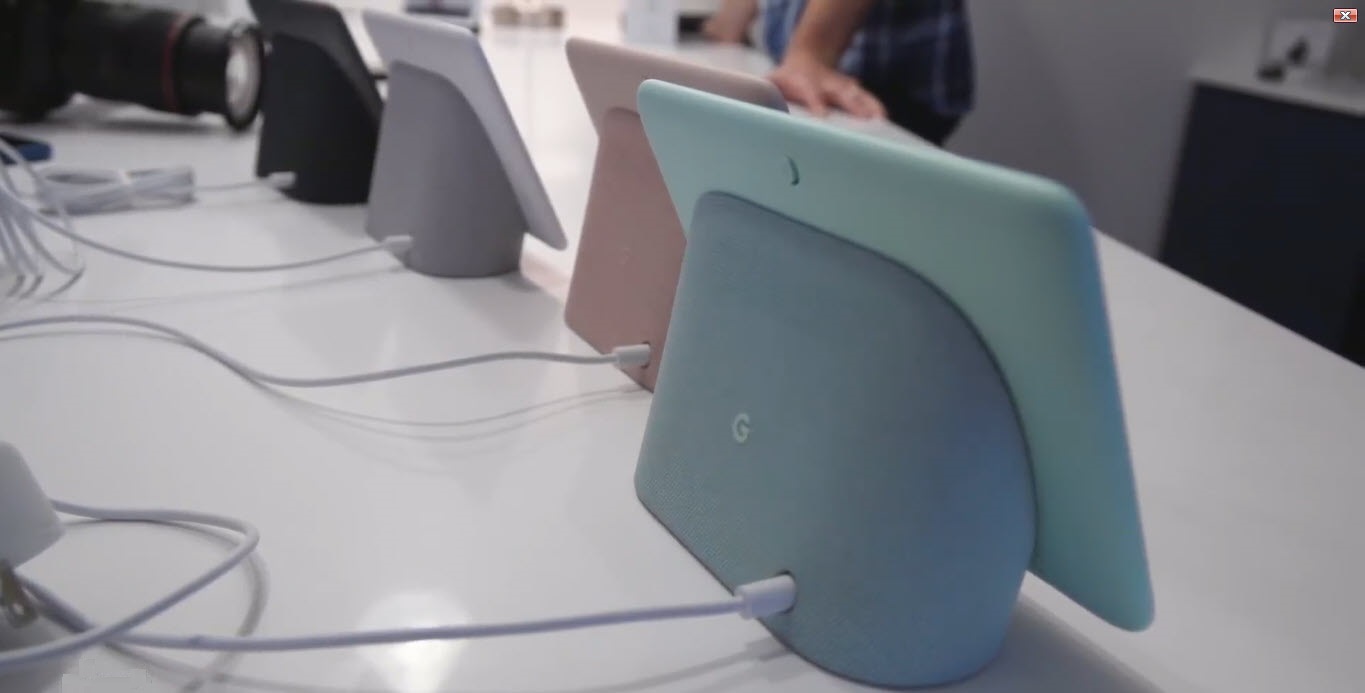

Features & Controls:

Google Home Hub comes handy for viewing pics, watching videos, and live Television with Youtube Tv. It shows more information if you ask about the weather, or for anything like Recipes to get the steps. It uses Google Assistant at the back-end which shows results with the help of touch screen.

You can control the volume from its back, or can give the Voice command or use its Touch Screen. It has a good mike and sound quality of the speaker inside it is good but not that equally good if you compare google home mini. Overall, its a cheap affordable device with interactive touch screen and looks cool placed anywhere as a photo frame.


The Hub will also allow access to Google photos, allowing users to enable “Live Albums” to create slideshows by identifying people that the user wants to see regularly, such as friends or family members. Users can also simply access albums on the fly with voice commands like, “Hey Google, show me my photos of last birthday.” If one will add a pic in the live albums, it will automatically show that new pic. The HD display will also play videos from YouTube, and moreover it will come with free six months YouTube Premium subscription.

One can use it in the Kitchen or in the Drawing Room and it looks pretty beautiful anywhere as its small and looks like a tablet with a speaker and google assistant voice inside it.

It can handle a most of everyday productivity functions like issuing commands, making shopping lists, asking for a song to play and placing audio calls. Like other Google Assistant-supported devices, it uses a voice-matching function to identify separate users and deliver their calendar, commuting details, and reminders, which are displayed by the screen visuals.
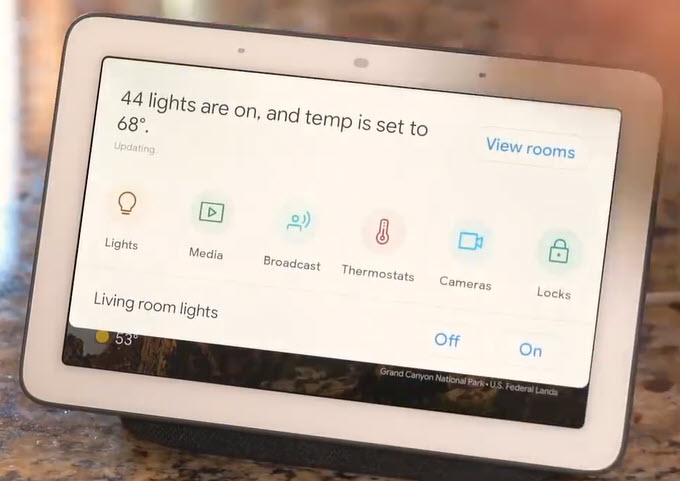


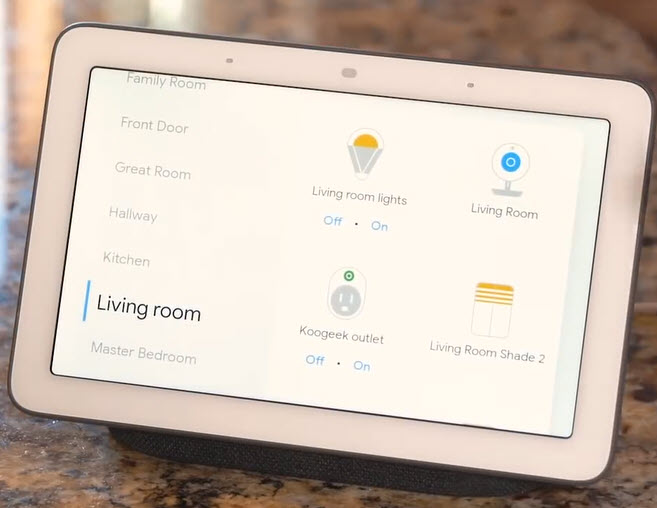
It has a smart home dashboard called “Home View” that Hub users can swipe down on the touchscreen to access every smart home gadget, such as lights, media, broadcast, thermostats, cameras, locks and speakers. Click View Room option to see all of your Smart Phone Devices out here room by room. Similar Home View is also available on the new Pixel 3 phone.

Sound quality

If we look at listening to just music perspective, the Home Hub sounds somewhere in between the Google Home and the Home Mini. It can get pretty loud and clear, but lacks any real bass and sounds pretty unpleasant at 100% volume, and one can easily say its not a smart speaker to buy for rocking out.

It does a great job of rendering the Assistant’s voice, and works perfectly well for watching YouTube videos and news broadcasts. But Comparing to the audio you get from Amazon’s first-generation Echo Show, it lacks the quality in audio.

Cons:

Unlike other smart displays, Google Home Hub lacks a camera, which may be either a good or bad, completely depending on how you feel about your privacy and the lack of ability to video chat. The only buttons on the outside of the Hub are volume up/down and mic on/off. The HD Screen sometimes seems too small to watch videos for an extended period of time. In the last, it doesn't have a 3.5 mm socket.

Price:

Google Home Hub features Google Voice assistant and will be available for $150, with a slightly lower competitive price of Lenovo Smart Display, which starts at $199. Google Home Hub price in India is expected to be Rs. 11,000. Google Home Hub will start shipping from October 22, 2018.

Comparison with Lenovo Smart Display:

When placed next to the Lenovo Smart Display, which is another Google Assistant smart speaker with a touchscreen, one can easily tell the difference clearly in size like comparing a tablet to a smartphone. It seems Home Hub’s small size makes it more versatile and is designed for primary use in the kitchen.

Do you think Google Home Hub is a decent priced product from google and should be bought? I look forward to read your comments below.

Read more: Click Here

Ajey Kumar Gupta
(Microsoft Exchange Admin)

Next Blog: Publishers can embed Subscribe button inside their Youtube Videos